How to Use ChatGPT 4o To Write Better Emails
Learn how to use ChatGPT 4.0 to write clear, professional emails with ease. Customize tone, improve clarity, and save time with this powerful AI tool.


On this page
- How to Use ChatGPT 4.0 to Write Better Emails
- What is ChatGPT 4.0?
- Setting Up ChatGPT 4.0 for Writing Emails
- How ChatGPT 4.0 Helps Write Better Emails
- Step-by-Step Guide: Writing Emails with ChatGPT 4.0
- Step 1: Provide Context
- Step 2: Choose the Tone and Style
- Step 3: Let ChatGPT Draft the Email
- Step 4: Review and Edit
- Step 5: Personalize Where Needed
- Examples of ChatGPT 4.0 Email Prompts
- Example 1: Writing a Professional Email
- Example 2: Crafting a Friendly Reminder
- Example 3: Apology Email for a Missed Deadline
- Example 4: Job Application Email
- Example 5: Follow-Up After a Meeting
- Tips for Writing Effective Emails with ChatGPT 4.0
- 1. Be Specific with Your Prompts
- 2. Use the Right Tone for Your Audience
- 3. Keep Emails Concise
- 4. Personalize When Necessary
- 5. Use It for Proofreading
- Common Mistakes to Avoid
- 1. Over-Relying on the AI
- 2. Giving Vague Prompts
- 3. Ignoring the Recipient’s Preferences
- 4. Not Adjusting the Tone
- Conclusion: How to Use ChatGPT 4o to Write Better Emails
How to Use ChatGPT 4.0 to Write Better Emails
1. ChatGPT 4.0 helps create well-structured, clear, and professional emails.
2. You can customize the tone of emails, whether formal, casual, or professional.
3. ChatGPT 4.0 provides proofreading to ensure emails are error-free.
4. Being specific in prompts improves the accuracy and relevance of the emails ChatGPT 4.0 generates.
5. Always review and personalize the email before sending to ensure it fits your style.
We’ve seen ChatGPT grow from version 3 to version 4, and now we have ChatGPT 4.0.
With this latest update, writing emails has become even easier and quicker.
Let’s explore how ChatGPT 4.0 can make your email writing more efficient.
ALSO READ: 10 ChatGPT Prompts To Enhance Your Trading with AI

What is ChatGPT 4.0?
ChatGPT 4.0 is the latest version of OpenAI’s language model, designed to make tasks like writing emails even easier.
Compared to previous versions, ChatGPT 4.0 understands context better, handles more complex inputs, and provides smoother, more accurate responses.
It’s especially useful for writing emails, as it can adjust the tone, structure, and language based on who you’re emailing and what message you want to convey.
This update builds on the progress made in earlier versions, making communication faster and more efficient.
Setting Up ChatGPT 4.0 for Writing Emails
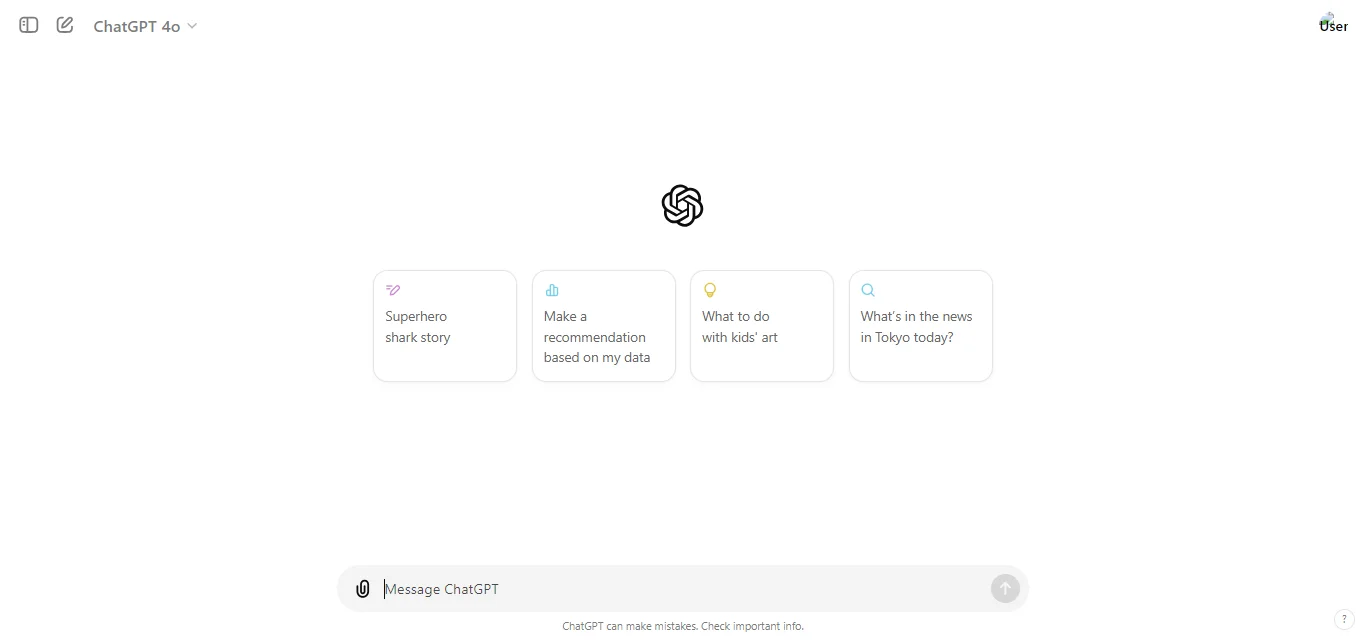
Before you start using ChatGPT 4.0 to write emails, you’ll need to make sure you’re all set up.
First, ensure you have access to ChatGPT 4.0, which may require a subscription to ChatGPT Plus.
Once you have access, simply open the chat interface, and you’re ready to start.
ChatGPT 4.0 is very flexible, so you can adjust settings to match the tone and style you need for your emails.
Whether it’s a professional tone or something more casual, you can customize ChatGPT’s responses to suit your needs.
How ChatGPT 4.0 Helps Write Better Emails
ChatGPT 4.0 is designed to make email writing easier and more efficient, no matter the situation.
It starts by understanding the tone and style you need for each email.
Whether you’re drafting a formal email to a client or a casual message to a friend, ChatGPT 4.0 adapts the language to match the recipient and the purpose of the email.
One of the standout features is its ability to structure emails effectively.
It can automatically organize your message, ensuring there’s a clear introduction, body, and conclusion.
This helps make your emails more professional and easier to follow.
For example, if you need to send a request, ChatGPT 4.0 can format your email to be polite yet direct, with a clear call to action.
Another helpful feature is its proofreading capability.
ChatGPT 4.0 checks for grammar and spelling errors, making sure your email is polished and error-free before you hit send.
It can also adjust the level of formality depending on the context, whether you’re emailing a supervisor, a colleague, or a friend.
In addition, ChatGPT 4.0 handles more complex email writing tasks, like summarizing long conversations, responding to multiple questions, or writing follow-up emails.
It remembers important details from previous exchanges, helping you craft personalized responses that feel thoughtful and engaging.
Step-by-Step Guide: Writing Emails with ChatGPT 4.0
Using ChatGPT 4.0 to write emails is simple and straightforward.
Here’s a step-by-step guide to help you get the most out of it:
Step 1: Provide Context
Start by giving ChatGPT 4.0 some background information about your email.
For example, if you’re writing to your manager, mention what the email is about and who the recipient is.
This helps ChatGPT understand the tone and content you need.
Example: “I need to write an email to my manager, summarizing this week’s progress and asking for feedback.”
Step 2: Choose the Tone and Style
Next, tell ChatGPT how formal or casual the email should be.
This is where you can guide the AI on how you want the message to sound.
Example:
Make the email professional and to the point, but polite.”\
Step 3: Let ChatGPT Draft the Email
Once the context and tone are clear, ChatGPT 4.0 will generate a draft.
This will include a well-structured email with a proper introduction, body, and conclusion.
The draft will align with the tone and purpose you’ve outlined.
Example Output:
“Dear [Manager’s Name],
I hope this email finds you well. I wanted to provide a summary of the progress made this week on the [Project Name] and request your feedback on our next steps…”
Step 4: Review and Edit
After ChatGPT generates the draft, review it to make sure it meets your needs.
You can make small tweaks or ask ChatGPT to refine parts of the message, such as shortening certain sections or adding more detail.
Example:
“Can you add more details about the challenges we faced and how we overcame them?”
Step 5: Personalize Where Needed
Before sending the email, personalize it with specific details, such as names, project details, or any relevant dates.
This ensures the email feels authentic and not overly generic.
Example:
“Dear Sarah, I hope this email finds you well…”
With these easy steps, you can quickly draft, refine, and personalize emails using ChatGPT 4.0, saving time and ensuring your message is clear and professional.
Examples of ChatGPT 4.0 Email Prompts
Here are some examples of prompts you can use with ChatGPT 4.0 to write different types of emails.
These examples can help you get started and show how versatile ChatGPT 4.0 is in handling various email-writing tasks:
Example 1: Writing a Professional Email
ChatGPT Prompt:
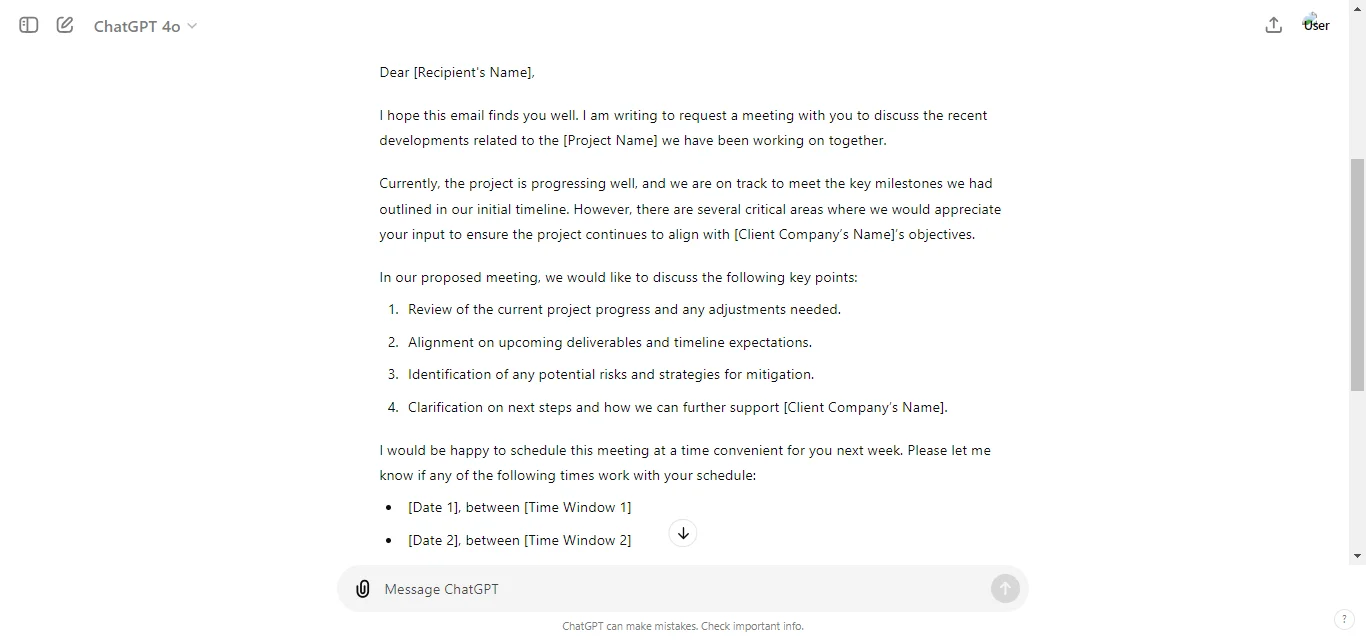
Act as a highly professional, detail-oriented project manager at a large consulting firm.
Your task is to write a formal email to the head of a client company. In this email, you need to:
Request a meeting to discuss recent project developments.
Provide a brief update on the project’s current status.
Outline key discussion points for the meeting.
Suggest possible meeting times for the following week.
Use placeholders for the names of the sender, recipient, companies, and project.
Your tone should be formal, respectful, and professional.
Be polite, clear, and concise.
Include an appropriate subject line, a polite salutation, and close the email with a professional sign-off.
Don’t forget to thank the recipient for their time and attention.
ChatGPT Response:
Example 2: Crafting a Friendly Reminder
ChatGPT Prompt:
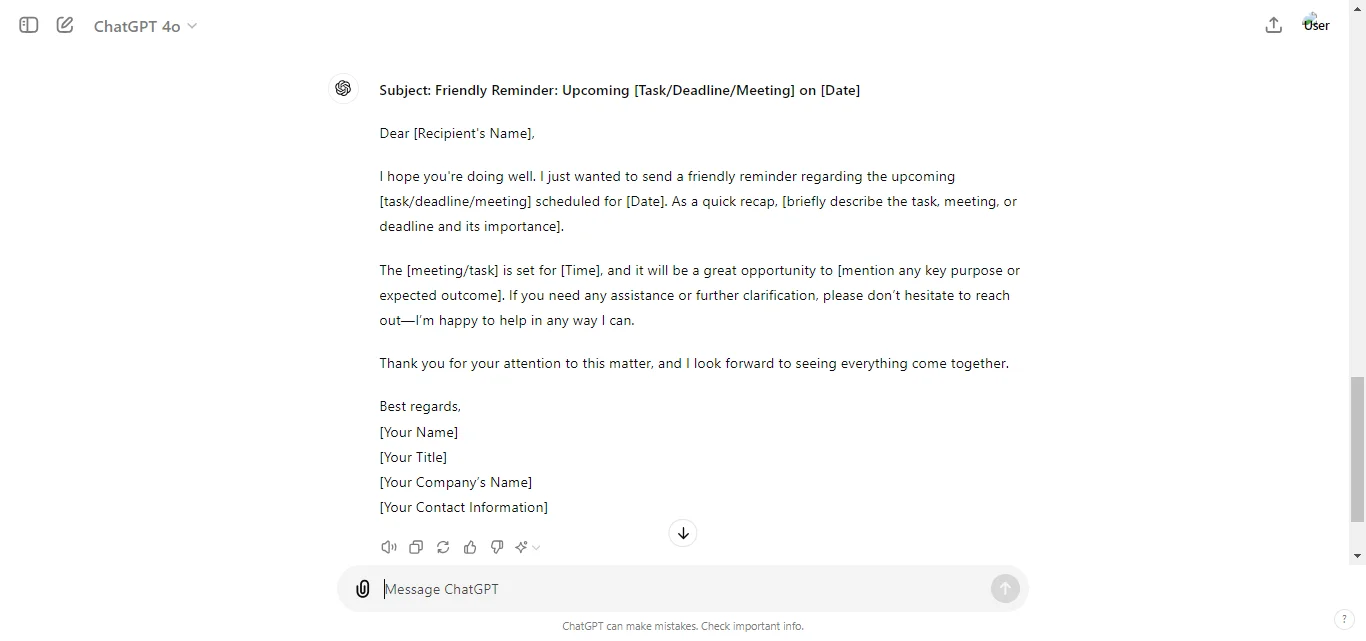
Act as a courteous and professional assistant at a mid-sized company.
Your task is to write a friendly reminder email to a colleague or client. In this email, you need to:
Gently remind the recipient of an upcoming deadline, task, or meeting.
Include key details such as the date, time, or the task’s importance.
Offer assistance or any further clarification if needed.
The tone should be warm, respectful, and professional.
Include a clear subject line, a polite salutation, and a friendly closing statement.
Be sure to thank the recipient for their attention to the matter.
ChatGPT Response:
Example 3: Apology Email for a Missed Deadline
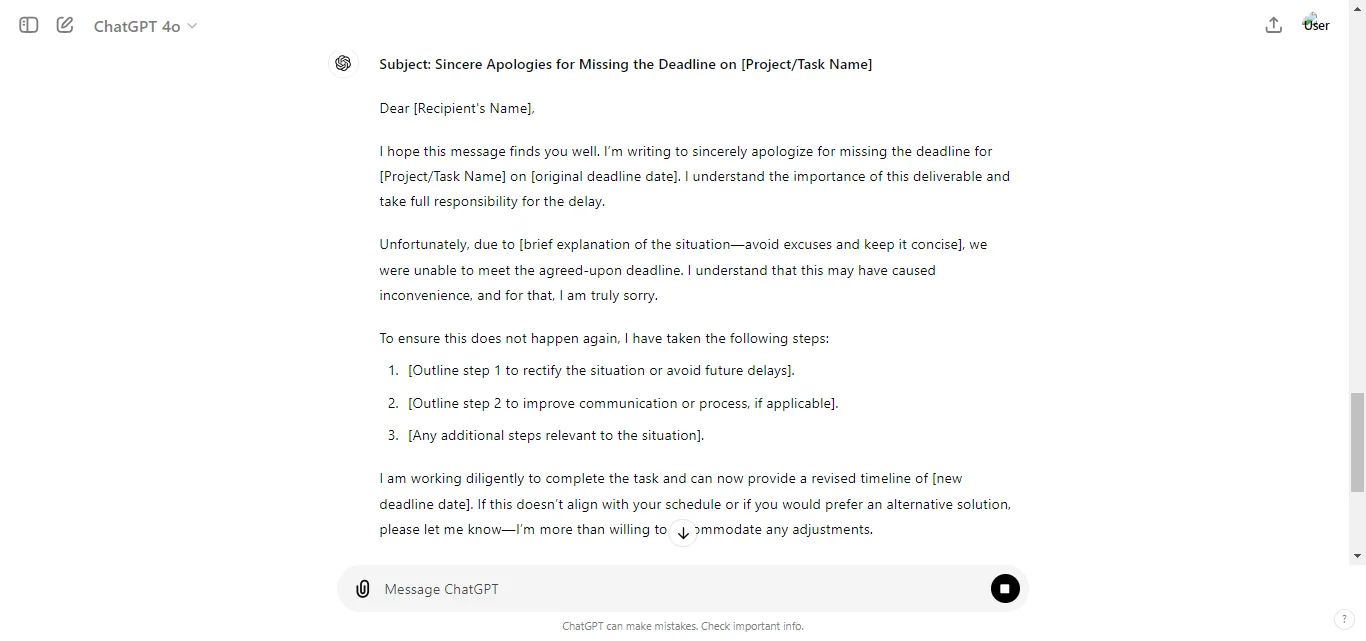
Act as a responsible and professional team member at a company.
Your task is to write an apology email to a client or colleague for missing a deadline. In this email, you need to:
Acknowledge the missed deadline and take responsibility.
Apologize sincerely for any inconvenience caused.
Explain the situation briefly without making excuses.
Outline steps you’re taking to rectify the situation and prevent future delays.
Provide a revised timeline or alternative solution if applicable.
ChatGPT Response:
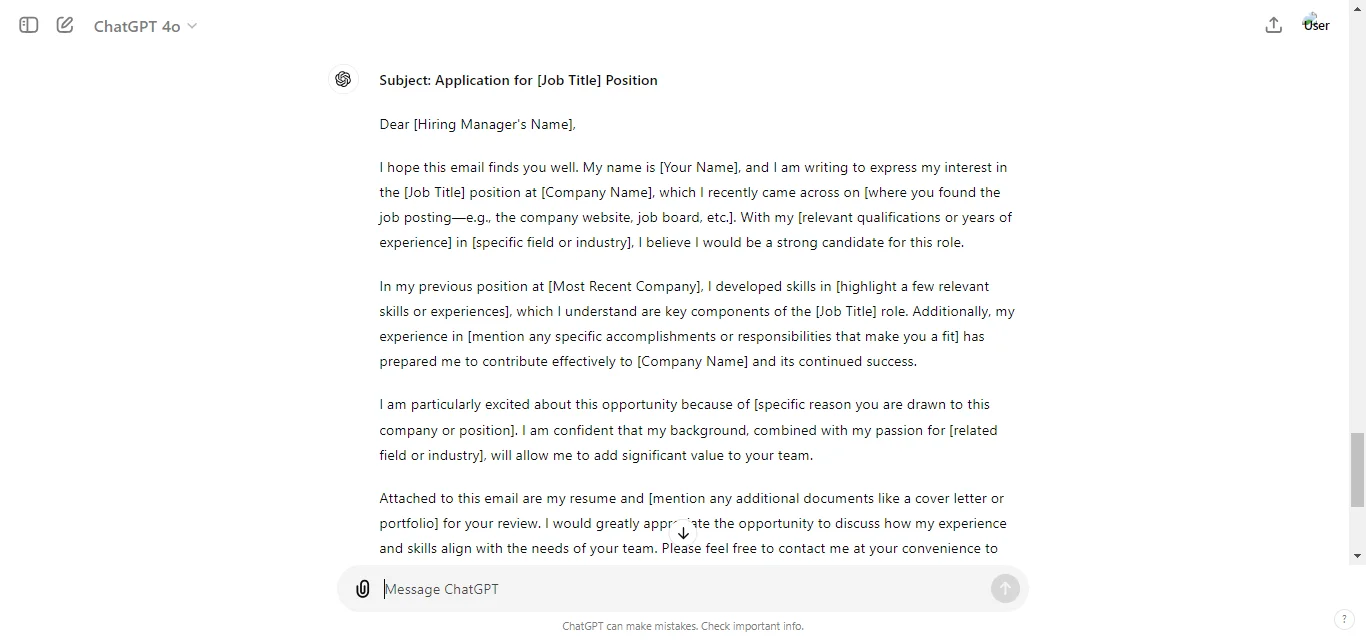
Example 4: Job Application Email
ChatGPT Prompt:
Act as a motivated and qualified professional applying for a job at a company.
Your task is to write a job application email to the hiring manager.
In this email, you need to:
Introduce yourself briefly, stating the position you’re applying for and how you found the opportunity.
Highlight your relevant qualifications and experiences that make you a strong candidate for the role.
Express your enthusiasm for the position and company.
Attach your resume and any other necessary documents (like a cover letter or portfolio) for their review.
Politely request a follow-up or an interview opportunity.
ChatGPT Response:
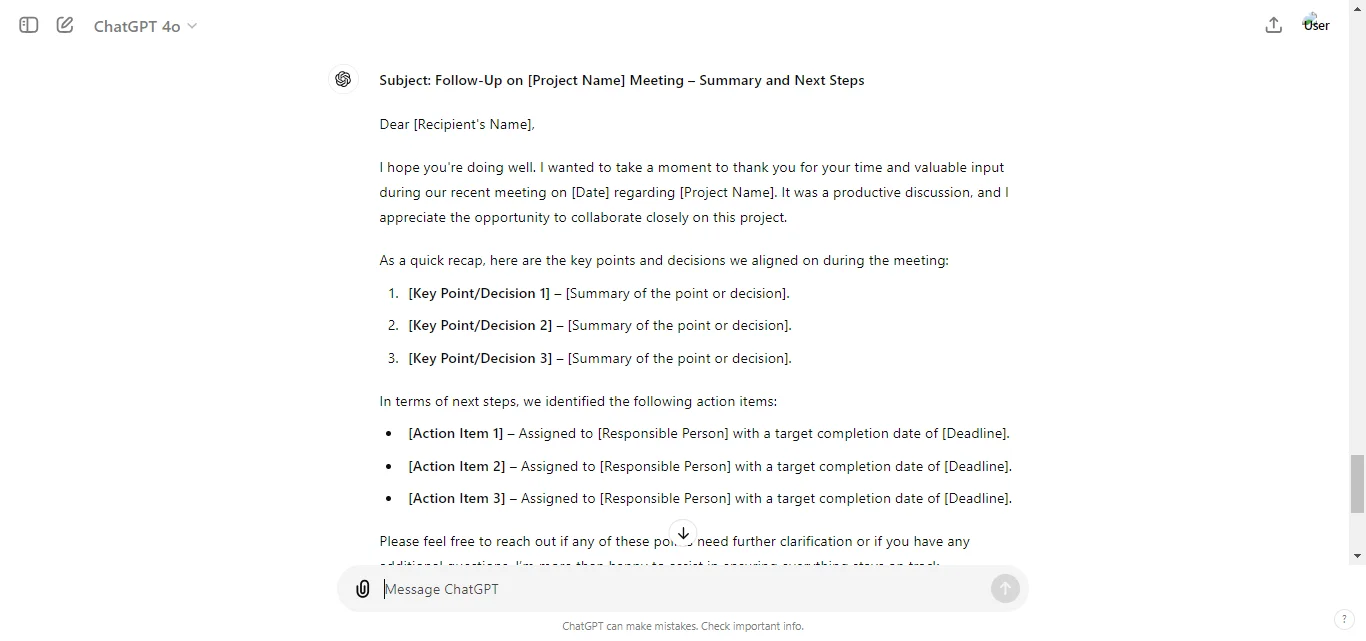
Example 5: Follow-Up After a Meeting
ChatGPT Prompt:
Act as a professional team member following up after a recent meeting with a client or colleague.
Your task is to write a follow-up email to the recipient. In this email, you need to:
Thank the recipient for their time during the meeting.
Summarize key points discussed during the meeting, ensuring alignment on any decisions made or next steps.
Clarify any outstanding actions or responsibilities, and set any necessary deadlines.
Express your willingness to assist with any further clarification or questions.
Use placeholders for the names of the sender, recipient, company, and project.
The tone should be polite, professional, and proactive. Include a clear subject line, a polite salutation, and a professional sign-off.
Be sure to thank the recipient for their attention and cooperation.
ChatGPT Response:
These examples show how easy it is to craft emails using ChatGPT 4.0, making it a useful tool for any type of communication.
Tips for Writing Effective Emails with ChatGPT 4.0
To get the most out of ChatGPT 4.0 when writing emails, here are some helpful tips:
1. Be Specific with Your Prompts
The clearer you are with your instructions, the better the email will be.
Instead of saying, “Write an email,” be detailed about what you need, like, “Write a formal email requesting time off next week due to personal reasons.”
2. Use the Right Tone for Your Audience
Tell ChatGPT the type of tone you want.
If you’re emailing your boss, ask for a professional tone.
For friends, request a casual tone. ChatGPT 4.0 adjusts based on your instructions.
3. Keep Emails Concise
Long emails can lose the reader’s attention. Ask ChatGPT to make your email short and direct, while still polite.
You can say, “Keep the email brief but professional.”
4. Personalize When Necessary
While ChatGPT 4.0 is great at creating drafts, always personalize the email before sending it.
Add personal touches like the recipient’s name, specific details, or anything unique to the conversation.
5. Use It for Proofreading
Before sending your email, you can ask ChatGPT to check it for grammar mistakes or awkward sentences.
Simply prompt, “Proofread this email for grammar and clarity.”
By following these tips, you will be able to write clear, concise, and effective emails with ChatGPT 4.0.
Common Mistakes to Avoid
While using ChatGPT 4.0 to write emails is a powerful tool, there are some common mistakes you’ll want to avoid to get the best results:
1. Over-Relying on the AI
It’s tempting to copy the email generated by ChatGPT without reviewing it, but always take a moment to read through and make sure it fits your needs.
AI-generated emails are a great starting point, but they might need some tweaking to sound more personal.
2. Giving Vague Prompts
If your prompt is too broad, ChatGPT might generate a generic or unclear email.
Instead of asking for “an email,” give specific instructions like, “Write a formal email to my manager asking for time off.”
3. Ignoring the Recipient’s Preferences
Even though ChatGPT can craft the email, keep in mind the recipient’s style or preferences.
Some people may prefer more direct communication, while others may like a friendly tone. Make sure the email reflects their style.
4. Not Adjusting the Tone
Don’t forget to specify the tone.
If you need a formal or casual email, include that in your prompt.
Failing to do so can lead to an email that doesn’t match the situation or audience.
By avoiding these mistakes, you can ensure your emails are clear, effective, and suited to the person you’re writing to.
Conclusion: How to Use ChatGPT 4o to Write Better Emails
Using ChatGPT 4.0 to write emails can save you time and help you craft professional, clear messages with ease.
By providing specific prompts, adjusting the tone, and personalizing the output, you can create emails that are tailored to your audience and purpose.
Whether you’re sending a formal work email or a casual note, ChatGPT 4.0 makes the process faster and more efficient.
Just remember to review the AI-generated drafts to ensure they reflect your unique style and preferences.
Put this into practice: browse ChatGPT prompts and Claude prompts in the God of Prompt library — copy, paste, and run.
Prompts for this topic
Put this article to work with ready-to-use prompts from the God of Prompt library.
Keep reading

How to Use ChatGPT as a Search Engine (And Get Better Answers!)
Learn how to use ChatGPT as a search engine to get faster, more accurate answers. Discover when it works better than Google, how to refine searches, and expert tips for better results.


10 ChatGPT Prompts for Follow Up Emails
Discover 10 powerful ChatGPT prompts to craft professional and effective follow-up emails. Perfect for sales, networking, feedback requests, and more. Save time and boost engagement with these simple and actionable ideas.

How to Write AI Prompts For ChatGPT and Gemini in 2026
Learn how to write effective AI prompts for ChatGPT and Gemini in 2026. This guide covers best practices, advanced techniques, and ethical considerations to maximize AI potential.


The best of the blog, in your inbox
One email when notable prompts, tools, and model updates land. No spam, unsubscribe anytime.
Join 100,000+ subscribers. One email a week, real prompts, tools, and model updates. Unsubscribe anytime.