Business Process Automation with Make.com: A Step-by-Step Guide
Learn how to automate your business processes with Make.com. This step-by-step guide covers integrations, advanced features, and tips for streamlining workflows effectively.


On this page
- Business Process Automation with Make.com: A Step-by-Step Guide
- Business Process Automation with Make.com: A Step-by-Step Guide
- What is Make.com?
- Why Make.com is a Game-Changer for Businesses
- 1. Time-Saving Automation:
- 2. Error Reduction:
- 3. Cost-Effective:
- 4. Scalability:
- 5. Enhanced Productivity:
- 6. Seamless Integration:
- Getting Started with Make.com
- 1. Sign Up:
- 2. Explore the Dashboard:
- 3. Connect Your Apps:
- 4. Create Your First Scenario:
- 5. Test and Activate:
- Business Process Automation with Make.com: A Step-by-Step Guide
- Connecting Make.com to Google Forms: A Step-by-Step Guide
- 1. Log in to Make.com:
- 2. Create a New Scenario:
- 3. Add Google Forms Module:
- 4. Set Up the Trigger:
- 5. Add an Action Module:
- 6. Test the Scenario:
- 7. Activate the Scenario:
- Free Workflow Automation Templates from Make.com
- What Can You Find in the Template Library?
- 1. Ready-to-Use Scenarios:
- 2. App-Specific Templates:
- 3. Customizable Options:
- Example Templates
- Google Forms to Google Sheets:
- Slack Notifications for New Emails:
- Trello Task Creation:
- Why Use Templates?
- Save Time:
- Reduce Errors:
- Learn from Experts:
- Exploring Other Integrations
- 1. Trello:
- 2. Mailchimp:
- 3. Dropbox:
- 4. Salesforce:
- 5. Shopify:
- Tips for Maximizing Make.com’s Potential
- 1. Start with Templates:
- 2. Test Your Scenarios:
- 3. Use Filters and Routers:
- 4. Monitor and Optimize:
- 5. Leverage the Community:
- Common Mistakes to Avoid When Using Make.com
- 1. Overcomplicating Workflows:
- 2. Neglecting Testing:
- 3. Ignoring Error Handling:
- 4. Failing to Document Scenarios:
- 5. Overlooking Permissions and Security:
- Wrapping Up: Automate Your Business Tasks with Make.com: A Step-by-Step Guide
Business Process Automation with Make.com: A Step-by-Step Guide
Streamline Processes: Automate repetitive tasks like data entry and notifications, saving time and reducing manual errors.
Integration Powerhouse: Make.com connects with over 2,000 apps, including Google Sheets, Slack, and Shopify, for seamless workflow management.
User-Friendly: The drag-and-drop interface and free templates make automation accessible, even for beginners.
Advanced Features: Tools like data stores, error handling, and HTTP modules enable complex and reliable automation scenarios.
Versatile Applications: Make.com benefits industries like marketing, customer service, and e-commerce, making it ideal for businesses of all sizes.
A few months ago, I hit my breaking point.
My days were consumed with jumping between Google Docs, updating spreadsheets, managing Google Forms, and trying to keep everything organized.
It felt like I was spending more time on repetitive tasks than actually growing my business.
I’d make updates in one place, forget to do it in another, and end up with messy data and wasted hours.
That’s when I stumbled upon Make.com, a tool that promised to connect all my apps and automate these never-ending tasks.
Skeptical but hopeful, I decided to give it a shot.
Spoiler: it changed everything.
Suddenly, my documents, spreadsheets, and forms were working together seamlessly, and I finally had time to focus on the big picture.
ALSO READ: 15 Mind-Blowing ChatGPT Features

Business Process Automation with Make.com: A Step-by-Step Guide
What is Make.com?
Make.com is a platform that connects all the tools you’re already using—like Google Docs, Notion, Forms, Gmail—and gets them to work together without you lifting a finger.
The beauty of Make.com is that it takes those small, repetitive tasks off your plate.
You know, the ones that eat up hours of your day but don’t really move the needle for your business.
Why Make.com is a Game-Changer for Businesses
When I started using Make.com, I realized it wasn’t just about saving time—it was about working smarter.
Here’s why it stands out:
1. Time-Saving Automation:
Tasks that used to take me hours—like updating spreadsheets or sending follow-up emails—are now done automatically.
No more manual data entry!
2. Error Reduction:
When I was doing everything manually, mistakes were inevitable.
Make.com ensures everything runs smoothly and accurately, whether it’s transferring data or generating reports.
3. Cost-Effective:
Instead of hiring someone to manage repetitive tasks, Make.com does it all for a fraction of the cost.
4. Scalability:
As my business grew, I needed tools that could grow with me.
Make.com lets me add more apps and workflows without any hassle.
5. Enhanced Productivity:
By automating routine tasks, I could focus on strategic initiatives, leading to increased productivity and business growth.
6. Seamless Integration:
Make.com connects with various apps I already use, creating a cohesive workflow without the need to switch platforms.
It’s not just a tool; it’s like a personal assistant for your business that never gets tired.
Getting Started with Make.com
Here’s how you can get started:
1. Sign Up:
Head over to Make.com and create a free account.
The registration is quick, and you’ll be up and running in no time.
2. Explore the Dashboard:
Once logged in, you’ll find a user-friendly dashboard.
Take a moment to familiarize yourself with the layout.
The main sections include:
Scenarios: This is where you’ll build your automated workflows.
Templates: Pre-built scenarios that you can use or customize.
Apps: A list of applications you can connect with Make.com.
3. Connect Your Apps:
To start automating, you’ll need to link your existing apps.
For instance, to connect Google Docs:
Click on ‘Apps’ in the dashboard.
Search for ‘Google Docs’ and select it.
Follow the prompts to authenticate your Google account.
4. Create Your First Scenario:
A scenario is a set of actions that Make.com will perform automatically.
To create one:
Click on ‘Scenarios’ and then ‘Create a new scenario.’
Choose the apps you want to include (e.g., Google Docs and Gmail).
Define the trigger (e.g., when a new document is created) and the action (e.g., send an email notification).
5. Test and Activate:
Before finalizing, run a test to ensure everything works as expected.
Once satisfied, activate the scenario, and Make.com will handle the rest.
Business Process Automation with Make.com: A Step-by-Step Guide
Connecting Make.com to Google Forms: A Step-by-Step Guide
Integrating Google Forms with Make.com can simplify your data collection and processing tasks.
Here’s how you can set it up:
1. Log in to Make.com:
Access your Make.com account.
If you don’t have one, sign up at Make.com.
2. Create a New Scenario:
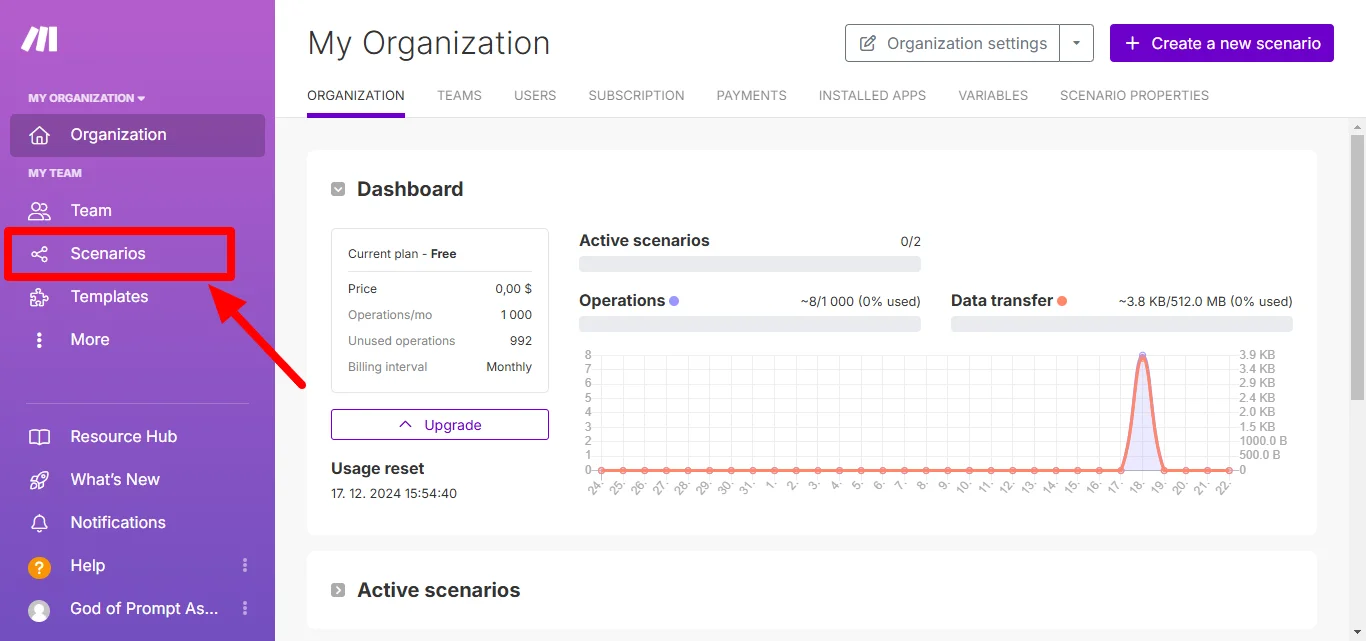
Click on ‘Scenarios’ in the dashboard.
Select ‘Create a new scenario.’
3. Add Google Forms Module:
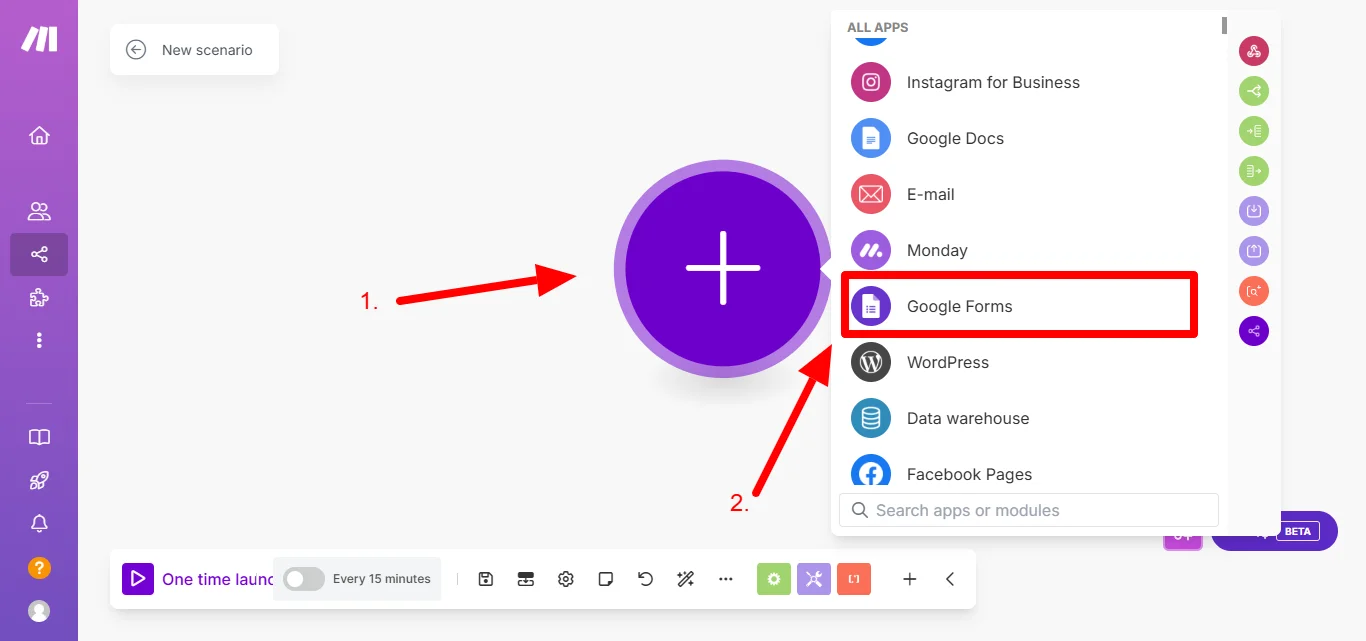
In the scenario builder, click the ‘+’ button to add a module.
Search for ‘Google Forms’ and select it.
4. Set Up the Trigger:
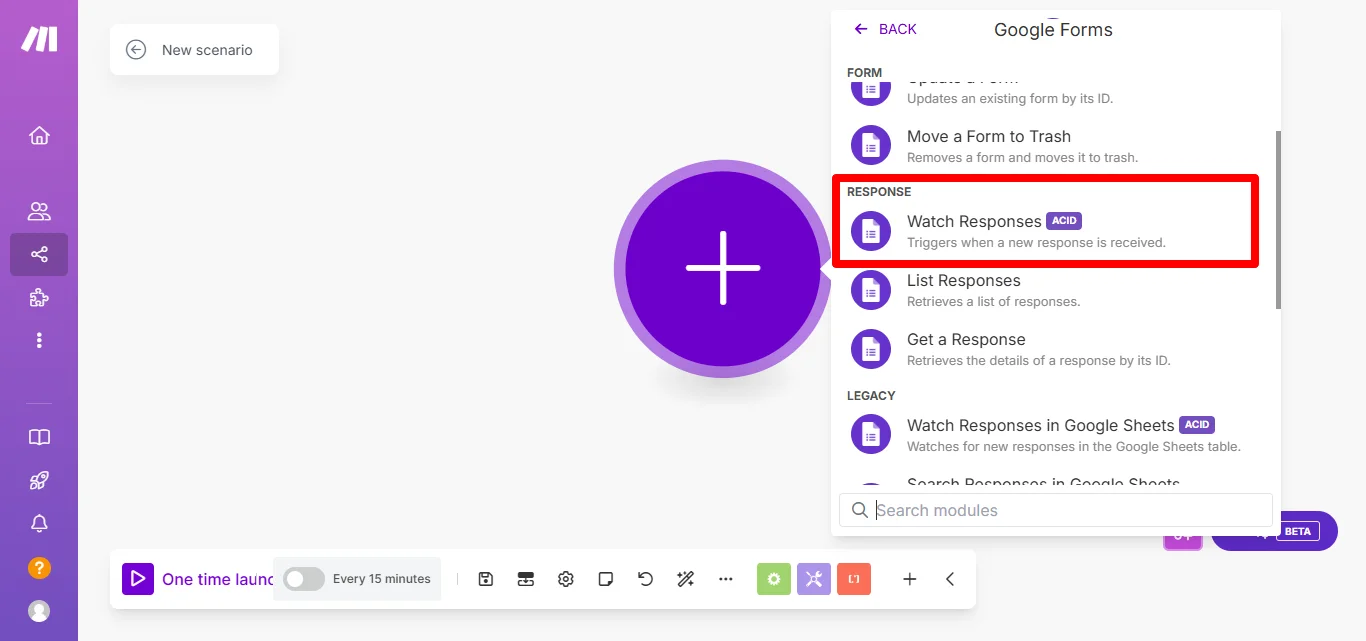
Choose ‘Watch Responses’ as the trigger.
This will monitor new responses in your form.
Click ‘Add’ to create a connection.
Authenticate your Google account to grant Make.com access to your Google Forms.
Select the specific form you want to monitor.
5. Add an Action Module:
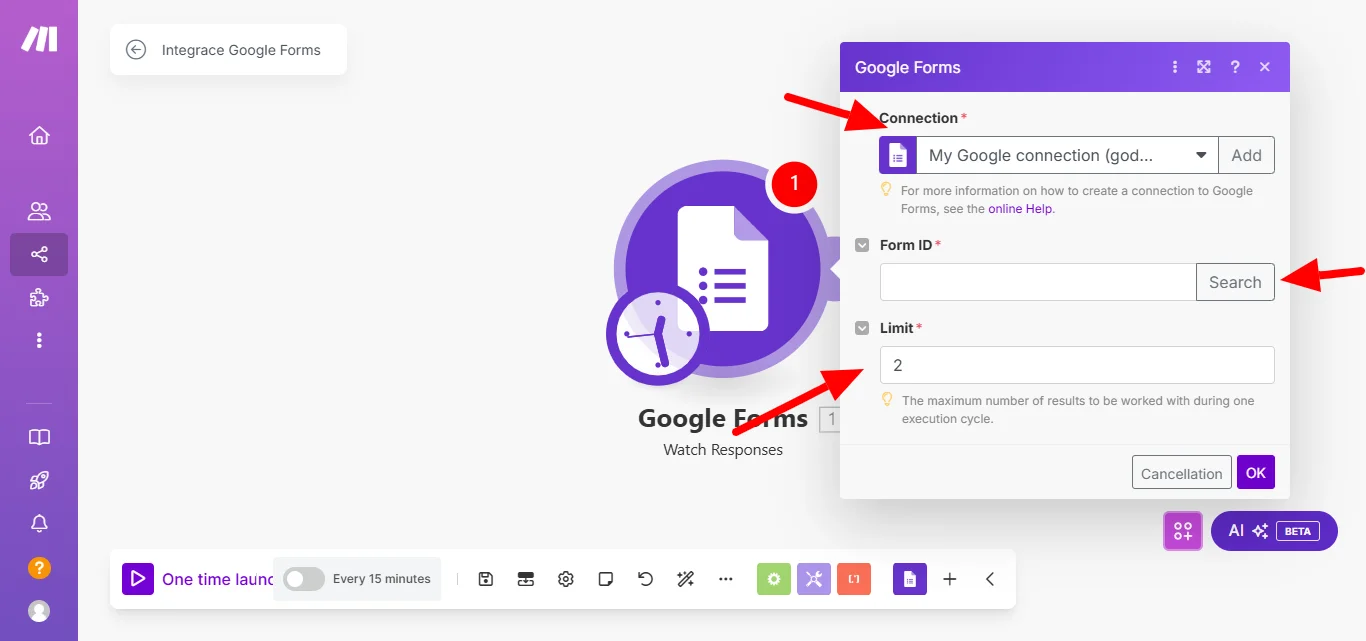
Click the ‘+’ button to add another module.
Choose the action you want to perform with the form responses.
For example, to add responses to a Google Sheet:
Search for ‘Google Sheets’ and select it.
Choose ‘Add a Row’ as the action.
Connect your Google Sheets account.
Select the spreadsheet and sheet where you want to add the data.
Map the form responses to the corresponding columns in the sheet.
6. Test the Scenario:
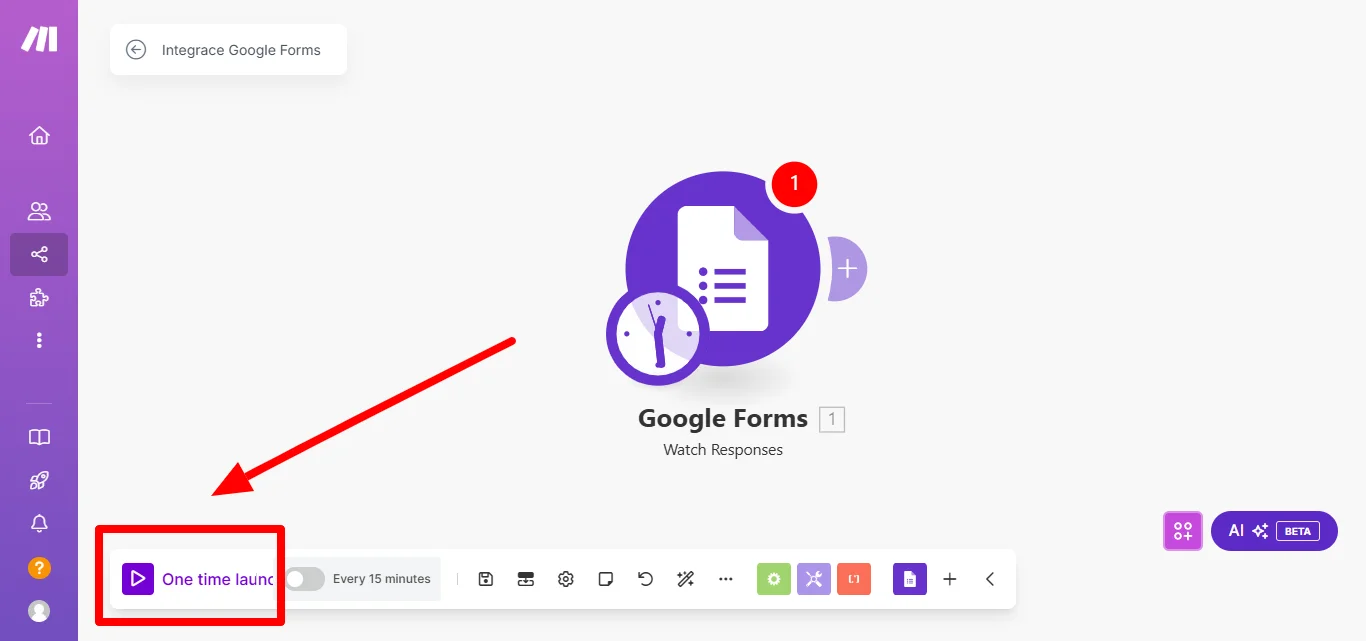
Click ‘Run once’ to test the setup.
Submit a test response to your Google Form.
Check if the data appears correctly in your Google Sheet.
7. Activate the Scenario:
If the test is successful, click the ‘On/Off’ switch to activate the scenario.
Make.com will now automatically process new form responses as defined.
By following these steps, you can automate the handling of Google Form responses, saving time and reducing manual errors.
Free Workflow Automation Templates from Make.com
One of the standout features of Make.com is its library of free workflow automation templates.
These templates are pre-designed scenarios that help users quickly set up automations without starting from scratch.
Even if you’re new to the platform or an experienced user, these templates can save you time and provide inspiration for creating custom workflows.
What Can You Find in the Template Library?
1. Ready-to-Use Scenarios:
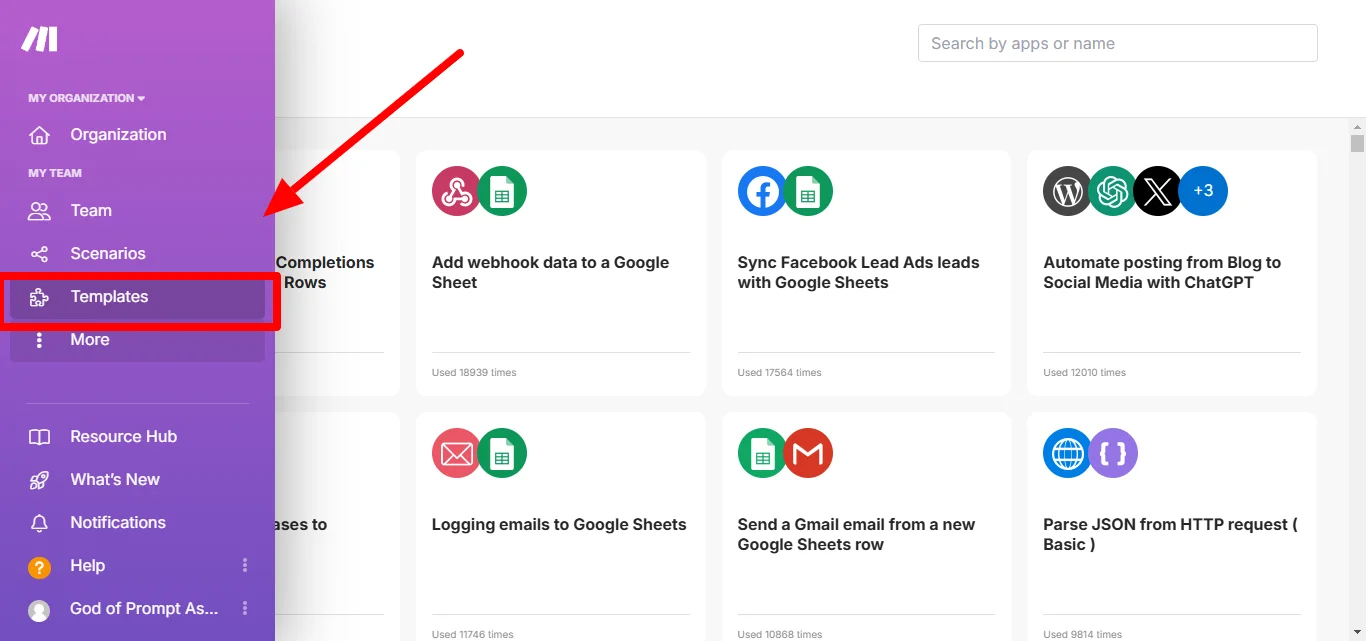
Templates cover a wide range of use cases, including customer support, marketing, sales, and project management.
2. App-Specific Templates:
For popular tools like Google Sheets, Slack, Trello, and Shopify, Make.com offers dedicated templates to streamline common tasks.
3. Customizable Options:
While these templates are ready to use, they can also be tailored to fit your specific business needs.
Example Templates
Google Forms to Google Sheets:
Automatically send form responses to a spreadsheet for easy tracking.
Slack Notifications for New Emails:
Get a Slack alert every time a specific email lands in your inbox.
Trello Task Creation:
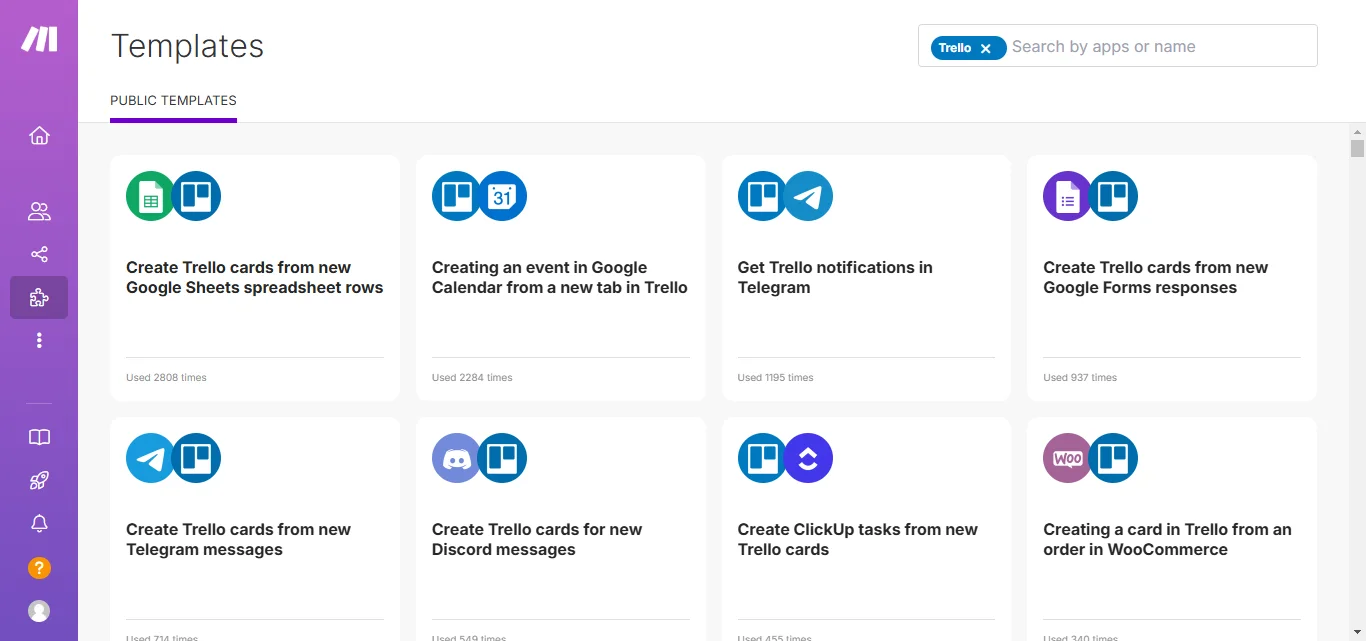
Automatically create a Trello card when a new task is added to a Google Sheet.
How to Access the Templates
1. Log in to your Make.com account.
2. Navigate to the Templates section on the dashboard.
3. Browse or search for a template that suits your needs.
4. Click “Use Template,” and the system will guide you through customizing it for your workflows.
Why Use Templates?
Save Time:
Get started quickly with pre-designed workflows.
Reduce Errors:
Templates are tested for functionality, minimizing setup mistakes.
Learn from Experts:
Templates offer a glimpse into best practices for automation, helping you create better custom workflows.
Using these free templates is an excellent way to unlock the full potential of Make.com and start automating your tasks right away.
Exploring Other Integrations
Make.com isn’t just limited to Google Forms, Sheets, or Slack; it connects with over 2,000 apps, allowing you to automate a wide range of tasks.
Here are a few integrations that can enhance your business operations:
1. Trello:
Automate task management by creating Trello cards from form submissions or emails.
For example, when a new customer inquiry comes in, a Trello card can be automatically created for your sales team to follow up.
2. Mailchimp:
Streamline your email marketing by adding new contacts to your Mailchimp lists automatically.
If someone fills out a subscription form on your website, their information can be sent directly to Mailchimp without manual entry.
3. Dropbox:
Manage your files efficiently by automating uploads and backups.
For instance, you can set up a scenario where any new file added to a specific folder on your computer is automatically uploaded to Dropbox.
4. Salesforce:
Enhance your customer relationship management by automating data entry and updates.
When a new lead is captured through a web form, their details can be automatically added to Salesforce, ensuring your sales team has the latest information.
5. Shopify:
Simplify your e-commerce operations by automating order processing and inventory management.
For example, when an order is placed, Make.com can update your inventory levels and notify your shipping department.
By exploring these integrations, you can create customized workflows that save time and reduce errors, allowing you to focus on growing your business.
Tips for Maximizing Make.com’s Potential
To get the most out of Make.com, consider these practical tips:
1. Start with Templates:
Make.com offers a variety of pre-built templates to help you get started quickly.
These templates can serve as a foundation, which you can customize to fit your specific needs.
2. Test Your Scenarios:
Before fully implementing automation, use the ‘Run once’ feature to test your scenarios.
This helps identify and fix any issues, ensuring your automation works as intended.
3. Use Filters and Routers:
Filters allow you to set conditions for when an action should occur, while routers enable you to split your scenario into multiple paths.
These tools add flexibility and precision to your workflows.
4. Monitor and Optimize:
Regularly check the execution history of your scenarios to monitor performance.
If you notice any inefficiencies or errors, adjust your scenarios accordingly to maintain optimal performance.
5. Leverage the Community:
Make.com has an active community where users share tips, templates, and solutions.
Engaging with this community can provide valuable insights and help you overcome challenges.
By applying these tips, you can enhance your automation workflows, making your business processes more efficient and effective.
Common Mistakes to Avoid When Using Make.com
While Make.com is a powerful tool, it’s essential to be aware of common pitfalls to ensure smooth automation.
Here are some mistakes to watch out for:
1. Overcomplicating Workflows:
Starting with overly complex scenarios can lead to errors and make troubleshooting difficult.
Begin with simple automations and gradually add complexity as you become more comfortable with the platform.
2. Neglecting Testing:
Implementing automations without thorough testing can result in unintended consequences.
Always use the ‘Run once’ feature to test your scenarios before full deployment.
3. Ignoring Error Handling:
Not setting up error handlers can cause your scenarios to fail silently, leading to missed tasks or data loss.
Incorporate error handling modules to manage exceptions and ensure reliability.
4. Failing to Document Scenarios:
Without proper documentation, understanding and maintaining your automations can become challenging, especially as they grow in number and complexity.
Keep clear notes on each scenario’s purpose and functionality.
5. Overlooking Permissions and Security:
Granting excessive permissions or neglecting security settings can expose your data to risks.
Ensure that each connected app has the appropriate permissions and regularly review your security configurations.
By being mindful of these common mistakes, you can create more efficient and reliable automations with Make.com.
Wrapping Up: Automate Your Business Tasks with Make.com: A Step-by-Step Guide
Incorporating Make.com into your business operations can significantly enhance efficiency and productivity.
By automating routine tasks, you free up valuable time to focus on strategic initiatives.
Embracing automation not only simplifies workflows but also positions your business for sustained growth and success.
Next step: turn this article into output with productivity prompts, or go deeper with business prompts.
Prompts for this topic
Put this article to work with ready-to-use prompts from the God of Prompt library.
Keep reading

Top Prompt Bundles for Business Automation and Productivity
Explore AI prompt bundles that automate tasks and enhance productivity across various business functions, offering ready-to-use solutions for efficiency.


How to Use AI to Make Money While You Sleep: The 5-Step System
Learn how to harness AI tools to create automated income streams, enabling you to earn money passively while you focus on other pursuits.

Automated YouTube: Kling AI and Make.com Integration
Streamline your YouTube channel with automation tools that enhance video creation, publishing, and performance tracking.

The best of the blog, in your inbox
One email when notable prompts, tools, and model updates land. No spam, unsubscribe anytime.
Join 100,000+ subscribers. One email a week, real prompts, tools, and model updates. Unsubscribe anytime.